
Fingerprinting with IdentoGO

As a part of the background check process, you are required to submit your fingerprints to both state and federal governments. This process is facilitated through the use of IdentoGO fingerprinting service.
Below is their contact information regarding how to schedule an appointment:
Before you Begin
Before you get started, be prepared with information about your program type and role.
On-line Scheduling Option – Available 24/7:
- Navigate to the Indiana Enrollment and Fingerprinting Services website at: https://in.ue.state.identogo.com/ue
- Enter your service code to get started.
- On the Service Code entry screen, use the guide below to enter the correct Service Code for the Fingerprint Reason as instructed by FSSA. Note: If codes are not working correctly when trying to schedule online, please call IdentoGO Customer Service at 1.877.472.6917.
- Juveniles Only (Under age 18): 24Y55F
- Child Care Center Employee: 24Y7GB
- Child Care Center Volunteer: 24Y7HV
- Child Care Home Employee: 24Y7BG
- Child Care Home Volunteer: 24Y7FY
- Licensed Exempt CCDF Certified Employees: 24Y7N6
- Licensed Exempt CCDF Certified Volunteers: 24Y7QQ
- Unlicensed Registered CC Ministry/Employee: 24Y7SK
- Once you enter this Fingerprint Reason, enter your OCA Number. This is the first five numbers of your Registered Ministry Number.
- Unlicensed Registered CC Ministry/Volunteer: 24Y7T2
- Once you enter this Fingerprint Reason, enter your OCA Number. This is the first five numbers of your Registered Ministry Number.
- Click Get Started once the correct code is entered.
Before continuing with registration, review the information displayed on the screen to make sure the fingerprint reason and requesting agency are correct. A Cancel button is available throughout the enrollment process beginning with this screen, allowing you to cancel and restart your enrollment if necessary. After verifying the information, click Start Enrollment.
Please note that all fields marked with an asterisk (*) are required and must be completed before proceeding. - Agree to all terms to continue the ordering process.
- Complete all required personal information, including legal name, alias information (if applicable), maiden or previous name information (if applicable), biographic information, date of birth, gender, hair color, eye color, race, height, weight, citizenship information, residential address, and mailing address if different from your residential address.
In the Contact Information section, select whether you would like to receive enrollment communications by Email or Text Message. If Text Message is selected, consent to and accept the applicable terms and conditions before continuing. - Schedule your appointment by selecting the enrollment center of your choice. Select a location, choose an appointment date and appointment time, and then confirm your appointment.
- Review your enrollment application for accuracy. Appointment location, appointment date, and appointment time may be edited from this screen if changes are needed. Review all personal and demographic information carefully and make any necessary corrections before continuing.
- Continue to the Payment and Confirmation screen. Accepted payment methods include Credit Card, eCheck, and Payment Code/Coupon Code. If you have been provided a Payment Code/Coupon Code, copy and paste the code into the Payment Code field and click Apply. Follow the prompts to complete payment, then click Pay and Submit to complete the enrollment process.
- Print or save the confirmation page and bring it with you to your fingerprinting appointment.
- Bring the confirmation page/registration ID and payment (if applicable), with one of the following pieces of identification to the appointment:
- Adults:
- Valid Driver’s License
- Valid State Issued Identification Card
- Valid Passport
- Juveniles:
- Student ID with Picture and DOB
- Work ID with Picture and DOB
- Valid Alien ID card with Picture and DOB
- If the juvenile/minor does not have the above identification, the parent and juvenile will both need to present a valid birth certificate and a social security card.
- Adults:
Arrive at the IdentoGO Enrollment Center at your appointed date and time. Juveniles must be accompanied by a parent or guardian. The Enrollment Agent at the site will check your valid photo ID, verify your demographic information, capture your fingerprints and submit your data in real time to the Indiana State Police for processing. The Fingerprinting Enrollment Center process normally takes less than five minutes. All results are processed by the Indiana State Police and the FBI before submitting to the Family & Social Services Administration (FSSA) as the Official Requesting Agency. Note: IdentoGO is never in possession of fingerprinting results.
Call Center Scheduling Option
Available Monday-Friday 7 a.m.-6 p.m.:
- Call 1.877.472.6917 to speak to an operator.
- Operators will collect the required information and schedule the fingerprinting appointment. Be sure to have complete information for the applicant available when calling, as the operator will ask for the Agency Name, Applicant Type, Registered Ministry Number if applicable and the Applicant’s full name, address, methods of contact and complete personal demographic information.
- When asked for which agency you are doing fingerprints, answer the Family and Social Services Administration (FSSA).
- When asked for a Service Code, provide the correct one for your child care program type and select if they are an employee or volunteer. If you do not provide the right code for your child care program type, you may be asked by licensing to redo your fingerprints.
- Juveniles Only (Under age 18): 24Y55F
- Child Care Center Employee: 24Y7GB
- Child Care Center Volunteer: 24Y7HV
- Child Care Home Employee: 24Y7BG
- Child Care Home Volunteer: 24Y7FY
- Licensed Exempt CCDF Certified Employees: 24Y7N6
- Licensed Exempt CCDF Certified Volunteers: 24Y7QQ
- Unlicensed Registered CC Ministry/Employee: 24Y7SK
- Once you share this fingerprint reason, you will be asked to provide your OCA Number. This is the first five numbers of your Registered Ministry Number.
- Unlicensed Registered CC Ministry/Volunteer: 24Y7T2
- Once you share this fingerprint reason, you will be asked to provide your OCA Number. This is the firstfive numbers of your Registered Ministry Number.
- Provide your ZIP code or city to locate the closest IdentoGO location for your fingerprint appointment.
- Select a date and time for that location.
- Provide the demographic information of the applicant who needs the appointment.
- In the event your fingerprint reason requires you to provide payment for fingerprinting, be prepared to make a payment at the facility or over the phone via card. Acceptable forms of payment include:
- Credit Card
- ECheck
- Business Check (pay onsite)
- Money Order (pay onsite)
- Billing Account
- If payment was already made, provide the referral code over the phone instead.
- Record your registration ID or check for an email confirmation if they provide one. If you provide an email address with the correct spelling, you will receive a confirmation email. If there is no email, ask for a registration ID from the representative and bring that to the appointment.
- Bring the confirmation page/registration ID and payment (if applicable), with one of the following pieces of identification to the appointment:
- Adults
- Valid Driver's License
- Valid State Issued Identification Card
- Valid Passport
- Juveniles
- Student ID with Picture and DOB
- Work ID with Picture and DOB
- Valid Alien ID card with Picture and DOB
- If the juvenile/minor does not have the above identification, the parent and juvenile will both need to present a valid birth certificate and a social security card.
- Adults
- Arrive at the IdentoGO Enrollment Center at your appointed date and time. Juveniles must be accompanied by a parent or guardian. The Enrollment Agent at the site will check your valid photo ID, verify your demographic information, capture your fingerprints and submit your data in real time to the Indiana State Police for processing. The Fingerprinting Enrollment Center process normally takes less than five minutes. All results are processed by the Indiana State Police and the FBI before submitting to the Family & Social Services Administration (FSSA) as the Official Requesting Agency. Note: IdentoGO is never in possession of fingerprinting results.
After your Fingerprinting Appointment
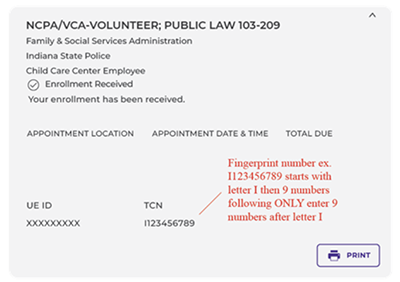
Step 1: Find your transaction control number (TCN)
Visit the Indiana IdentoGO website and select Check Enrollment Status. Use the identifying information associated with your registration to locate your enrollment.
Your Universal Enrollment ID (UEID) and Transaction Control Number (TCN) are different numbers:
- UEID: Begins with the letter “A” and helps you locate your enrollment
- TCN: The fingerprint transaction number needed to complete your consent form in I-LEAD
Do not enter your UEID in the TCN field.
Step 2: Complete Your Consent Form In I-LEAD
After obtaining your TCN, complete and electronically submit your consent form in I-LEAD. Enter the nine-digit TCN, without the beginning “I” in the Inkless Transaction Number field.
OECOSL needs the completed consent form and correct fingerprint transaction information to process your background check and qualification review.
Before You Can Complete Your Consent Form
New child care programs must complete the required licensing application steps before inviting staff
in I-LEAD. New employees must accept the educator invitation from their provider administrator before accessing their consent form.
Step 3: Check Your Qualification Status
After submitting your consent form, check your qualification status in I-LEAD. Completing fingerprinting or submitting a consent form does not, by itself, mean that you are qualified to work. Individuals must meet the applicable background check requirements and have a status that permits them to work.
Keep Your Fingerprint Information
IdentoGO has transitioned away from paper receipts, although some enrollment centers may continue to provide them during this transition.
Keep any information you receive when completing fingerprinting. We also recommend saving or printing your enrollment status information for your records.
If you have already completed fingerprinting but cannot locate the information you need, do not immediately schedule another fingerprint appointment. First use, Check Enrollment Status or contact IdentoGO Customer Service at 1.877.472.6917.
How to Check Your Fingerprint Expiration Date
The fingerprint expiration date is an estimated date based off when the consent form was last submitted.
- For Educators to see the actual fingerprint expiration date, log into I-LEAD and click View Details to see it listed in the Educator Details section.
- For Provider admins, log into I-LEAD and click View Details for your license under Providers I Administer, scroll down to the Associated Educator roster, and click View Details to see the fingerprint expiration date.
The date should show within a month of the consent form Submitted Date. If its missing, please either have the person redo their consent form or reach out to qualification.review@fssa.in.gov for assistance in submitting the IdentoGO fingerprint receipt.
Background Check Requirements & Information for Child Care Provider & Staff:
- A consent form is an electronic form available to those who accepted their educator invite that was sent to them by their provider admin or upon completion of a new licensing application
- Anyone on the premises where child care is conducted is required to get fingerprints and do a consent form
- A consent form gives permission from the educator to the state background unit to view the fingerprints and complete the background checks needed to work in child care
- Qualification Status. Individuals must have a current background check status that permits them to work in a child care setting.
- Qualified: The individual has received a qualified background check determination.
- Provisional: Eligible new employees may begin working while certain required background check components are pending, provided they remain under direct visual supervision at all times by an individual who has received a qualified background check result within the past three years.
- Provisional employees must remain under the required supervision until all applicable background check components are completed and the appropriate qualification determination status is made.
- Consent forms are provided electronically to a new hire when they accept an educator invite for a license (Note: Multiple invites may be needed before the educator can do their consent form if they work for multiple locations)
- Educators must renew their fingerprints with IdentoGO every (3) years
- Reminder: A consent form can only be done when the fingerprint information is submitted with it
- Providers are responsible for ensuring required fingerprints and consent forms remain current. An existing status displayed in I-LEAD does not replace the requirements to timely renew fingerprints and submit the required consent. Failure to maintain current background check requirements may result in a licensing violation.
IdentoGO Billing Issues:
Please contact the Billing Department via esd-billing@us.idemia.com if you need to dispute a payment or request a refund. The registration ID will be needed from the confirmation email sent at the time of the appointment. Check spam and junkmail for the email if it’s not in the inbox. Gmail users should check All Mail and Promotions. For a missing registration ID, you may need to call IdentoGO back and ask for it over the phone prior to emailing the billing department. For those who never received an email but saw the payment pulled on the account, you may need to send a screenshot of the payment to the billing department.
Need Additional Help?
For any additional questions or guidance with scheduling, enrollment lookup, or payment issues, please reach out to IdentoGO Customer Service at 1.877.472.6917 for assistance.
For any additional questions or guidance with I-LEAD, consent, qualification, or background check questions, please contact the OECOSL Child Care Support Line at 1-800-299-1627 or Qualitysupport@fssa.in.gov for assistance.